


The point of a “breaking news” scam text is speed. Scammers borrow the panic of a real event so you tap before you think, and a single tap can hand over your login, your card, or control of your phone.
When a wildfire, storm, or major news event hits, the smishing texts arrive within hours. They pose as evacuation maps, relief-fund links, urgent news alerts, or a warning that your account was compromised in the chaos. Text scams cost Americans hundreds of millions of dollars a year, and disaster themes work because fear shortcuts your judgment. Here are the ten signs that a breaking-news text is a trap, and what to do the moment one lands.
The three clearest red flags:
- It demands you act immediately — real alerts inform, scams pressure.
- It contains a link you’re told to tap now — genuine emergency alerts never do.
- It came from a number you never signed up with — you can’t get an “alert” you never subscribed to.
Quick reference: the 10 smishing red flags
| Warning sign | Why it’s a red flag |
|---|---|
| You never subscribed to the alert | Legit services don’t text people who never opted in |
| Extreme urgency or a countdown | Panic is the whole mechanism of the scam |
| A link you’re pushed to tap | Real emergency alerts contain no links |
| Odd sender number or email address | Official senders use verified short codes |
| Shortened or misspelled web address | Hides the true destination of the link |
| Impersonates FEMA, a charity, or a news outlet | Trusted names lower your guard |
| Asks for personal info or a login | Agencies don’t collect data by text |
| Wants a fee or payment for “aid” | Real disaster help is never pay-to-unlock |
| Sloppy grammar or a generic greeting | Mass scams skip real personalization |
| Tells you not to verify elsewhere | Isolation keeps you from checking the truth |
Table of Contents
1. You never signed up for the alert

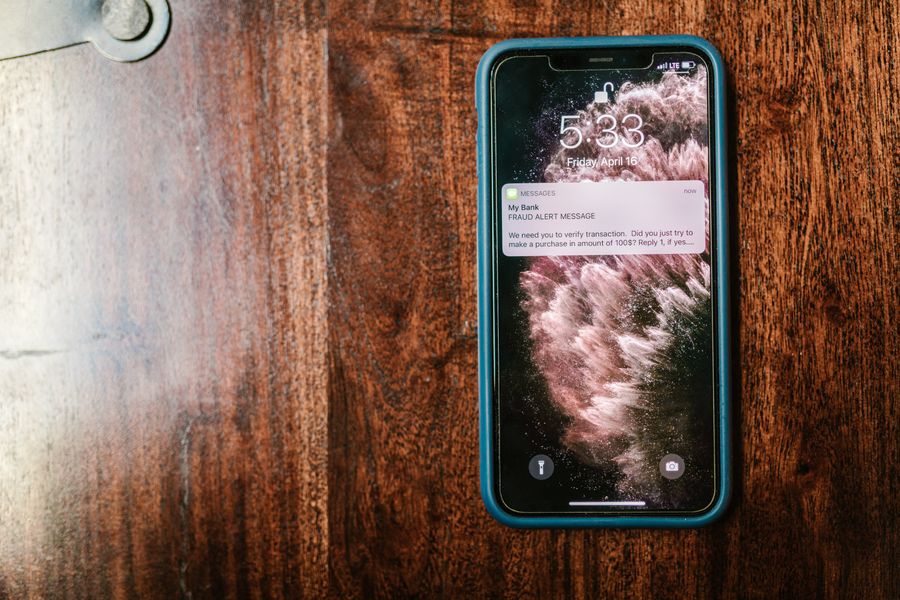
Start with the simplest question: did you ever ask for this? You cannot receive a legitimate “breaking news” or “account alert” text from a service you never gave your number to. Real emergency notifications come through channels you opted into, like your county’s alert system, or through the phone’s built-in Wireless Emergency Alerts, which you do not sign up for by text. If a message about a disaster, a delivery, or a compromised account arrives out of nowhere and you have no relationship with the sender, that mismatch alone is enough to treat it as a scam. Scammers blast these to millions of numbers and count on a few recipients who happen to be worried about that exact event.
2. It manufactures extreme urgency

Urgency is the engine of every smishing text. “Evacuate now,” “claim your relief before midnight,” “your account will be frozen in one hour” are all designed to spike your adrenaline so you act before you reason. Legitimate agencies and news outlets inform you; they do not threaten you with a ticking clock to force a tap. A real evacuation order tells you where to go, not which link to click in the next ten minutes. Any message that pairs a frightening claim with a hard deadline is trying to bypass the part of your brain that would otherwise notice the other red flags on this list. When you feel that jolt of panic, treat it as your cue to slow down, not speed up.
3. There’s a link you’re pushed to tap right away

Here is the detail most people miss: genuine Wireless Emergency Alerts, the government messages that blare during an Amber Alert or a flash-flood warning, never contain a clickable link. So a “breaking news” text that leads with a link is already suspect. Scammers rely on the link because tapping it is where the damage happens, whether it loads a fake login page, starts a malware download, or opens a spoofed relief-fund form. If a message insists you tap immediately to see a map, a photo, or an update, that pressure to click is the scam. Real news lives on websites and apps you can reach on your own, without following a stranger’s link.
4. The sender is a random number or email address
Look closely at who sent it. Banks, delivery services, and government agencies text from short, verified codes, the five or six digit numbers you see on real two-factor messages. A breaking-news alert that arrives from a full ten-digit mobile number, an international number, or an email-to-text address like a string of characters ending in a domain name is almost always a scam. Spoofing means the displayed sender is not always trustworthy either, but a plainly odd origin is a strong tell. If the “county emergency office” is texting you from someone’s personal cell number, the message is not what it claims to be.
5. The web address is shortened or subtly misspelled
Scam links hide where they really go. They lean on URL shorteners so you cannot see the destination, or they register look-alike domains that swap or add a character, turning a real agency’s name into a near-copy you would not notice while panicking. A relief link that reads like the real charity with one letter off, or a news domain you have never seen attached to a familiar network’s name, is a forgery. Never judge a link by the words in front of it, since the visible text can say one thing while the link points somewhere else entirely. When in doubt, do not tap, and type the organization’s known address into your browser yourself.
6. It impersonates FEMA, a charity, or a news outlet
Disaster scams wear a trusted uniform. The message may claim to be FEMA approving your aid, the Red Cross collecting donations, your power company about an outage credit, or a national news network with an exclusive update. The branding lowers your guard, but the behavior gives it away. FEMA, for example, only contacts people who have already applied for assistance, and it never texts demanding money or personal details, as the agency spells out in its guidance on disaster fraud. If you have not applied for or subscribed to anything, an official-looking name in the sender field is set dressing, not proof.
7. It asks for personal information or a login
No legitimate agency collects your Social Security number, bank details, or account password through a text link. That is simply not how they operate. A breaking-news or disaster text that routes you to a page asking you to “verify your identity,” “confirm your account,” or “log in to release your funds” is harvesting credentials. The page will often look convincing, a pixel-perfect copy of a real login screen, which is exactly the point. Treat any request for sensitive information that arrives by text as a scam by default, and enter your credentials only on a site you navigated to yourself, never one a message delivered you to.
8. It wants a fee or payment to unlock aid
Real disaster relief does not have a cover charge. When a text says you must pay a small processing fee, a delivery cost, or a deposit to receive a grant, a refund, or emergency assistance, that upfront payment is the theft. This includes requests to pay by gift card, wire transfer, cryptocurrency, or a payment app, which are the scammer’s favorite methods precisely because they are hard to reverse. Government aid and legitimate charity support flow to you without a toll gate. The moment money has to leave your hands before help arrives, you are looking at a scam, not a program.
9. The grammar is off or the greeting is generic
Mass-blasted scams rarely get the details right. Awkward phrasing, misplaced capital letters, odd spacing, and a greeting like “Dear user” or “Dear customer” instead of your name all point to a message written at scale by someone who does not actually know you. A real alert from a service you use can address your account specifics; a scam usually cannot, so it stays vague. These tells are getting subtler as scammers use better tools, so a clean-looking message is not automatically safe, but sloppy language remains a reliable giveaway when you see it.
10. It tells you not to check with anyone else
The most manipulative texts try to keep you isolated. They discourage you from calling the “real” number, warn that contacting anyone will delay your aid, or supply their own callback number so you never reach the genuine organization. Isolation is a control tactic, because the scam only survives as long as you do not verify it. Legitimate senders are happy for you to hang up and call the official line printed on your card, your bill, or the agency’s real website. Any message that fights your instinct to double-check is telling you, in its own way, exactly what it is.
What To Do If You Get One
If a suspicious text lands, handle it in this order and you will be fine:
- Do not tap the link or reply. Replying, even “STOP,” confirms your number is live and invites more scams.
- Verify independently. If you are worried it might be real, contact the agency, bank, or charity using a number or website you look up yourself, not anything in the text.
- Report it. Forward the message to 7726 (SPAM), which routes it to your carrier, and report text scams to the Federal Trade Commission. The FTC explains how in its guide to recognizing and reporting spam texts.
- Delete and block. Remove the message and block the sender so it stops resurfacing.
- If you already tapped, change any password you entered, watch your accounts, and run a security scan on your phone.
How We Chose These
We focused on the signs that hold up across every flavor of breaking-news scam, from fake evacuation maps to relief-fund and account-alert texts, rather than tells tied to one specific hoax. Priority went to cues you can check in seconds under pressure, like whether you opted in, whether a link is present, and whether money or personal data is being requested. We weighted the behaviors scammers cannot easily fake, such as the absence of links in real emergency alerts and the fact that agencies do not collect sensitive data by text, over surface details like typos that better tools are steadily cleaning up.
The Bottom Line
Breaking-news smishing works by rushing you, so the single best defense is to slow down. If a text about a disaster or urgent event pressures you to tap a link, hands you a deadline, or asks for money or personal information, assume it is a scam until you verify it through a channel you chose yourself. Real alerts inform you and let you check the facts; scams isolate you and start a clock. When one lands, do not tap, verify independently, forward it to 7726, and delete it. For more consumer-safety guidance, see our guide to spotting a found-pet scam text, and browse Visboo’s News section for what is actually happening.
Frequently Asked Questions
How do you know if a breaking news text is a smishing scam?
The strongest signs are that you never signed up for the alert, it pressures you to act immediately, and it contains a link you are told to tap. Genuine emergency alerts never include links and never demand money or personal information, so any breaking-news text that does is almost certainly a scam.
What is smishing?
Smishing is phishing carried out over text message (SMS). A scammer sends a message with an urgent hook and a malicious link, aiming to steal your login details, financial information, or money, or to install malware. Disaster and breaking-news themes are popular because fear makes people click faster.
Should I reply STOP to a scam text?
No. Replying anything, including “STOP,” tells the scammer your number is active and monitored, which usually leads to more scam texts. Instead, do not reply at all. Forward the message to 7726 (SPAM), then delete and block the sender.
Does FEMA or the government send text alerts with links?
Legitimate government emergency alerts, including Wireless Emergency Alerts, do not contain clickable links, and FEMA only contacts people who have already applied for assistance. Any text claiming to be FEMA or another agency that includes a link or asks for money or personal data is a scam.
What should I do if I already clicked a smishing link?
Do not enter any information if a page loads. If you already did, change that password immediately and any account that shares it, watch your bank and card statements, and run a security scan on your phone. Contact your bank directly if you shared financial details, and report the scam to the FTC.
Why do scam texts spike after disasters?
Disasters create a large group of frightened, distracted people looking for urgent information, which is exactly the audience smishing exploits. Scammers pose as relief funds, evacuation alerts, or news updates because the emotional stakes make recipients more likely to tap a link before checking whether it is real.