Your feed used to carry the small stuff that matters where you live: a road closure, a school board meeting, a house fire two streets over. Then it thinned out, and the local reporting stopped showing up. A common cause is a content control you or the app changed, a sensitive content filter or a restricted mode that swept up public-safety posts along with the graphic content it was meant to catch. The good news is that these are settings, not a permanent verdict, and a handful of checks usually brings local news back. Here is what to look at, app by app, without needing to know each menu by heart.
There is no single switch labeled “show me local news,” so this is a short process of ruling things out: loosen the filters, clear the signals that told the app to hide certain topics, and then tell it clearly what you do want to see. Work through the steps below and stop when your feed fills back in.
Why local news disappears from your feed
Two forces usually combine. The first is a safety filter. Apps run sensitivity or restricted settings that hide posts they judge graphic or mature, and local news often trips them, since a wreck, a fire, or a crime report is exactly the kind of content those filters target. The second is the algorithm itself. Most feeds rank posts by what keeps you engaged, so a quiet local outlet loses out to bigger accounts, and any “not interested” taps or muted words you added can wipe out a whole topic. Reddit threads about stories vanishing overnight usually come down to one of these, not a glitch. The fix is to relax the filter and reset the signals, then follow your local sources on purpose.

Check your sensitive content or restricted mode setting first
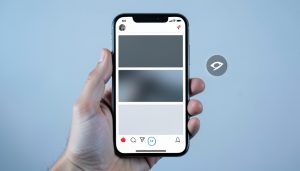
This is the setting most likely to be the culprit, so start here. On Instagram, open Settings, find the Sensitive Content Control, and move it off the most limiting option so the app stops hiding borderline posts. On X, look for the option to display media that may contain sensitive content and turn it on. TikTok has a Restricted Mode under Content Preferences that filters mature themes, and YouTube has its own Restricted Mode, both of which can hide news clips when left on. Check each app you use for news, because the setting lives in a different menu on each one, and a single filter left on the strict setting can quiet an entire category.
Clear muted words and blocked topics
A muted keyword can do more damage than you expect. If you once muted a word to avoid spoilers or upsetting posts, that same word can filter public-safety news, so a muted term like the name of a nearby town, or a word such as “shooting” or “fire,” will hide the exact local stories you want. Open your muted words or hidden-topics list and read through it with fresh eyes, then remove anything that overlaps with local coverage. The same goes for topic controls that let you see less of a subject; a broad choice to see less “news” or “politics” will take your neighborhood updates down with it.
Undo your “not interested” and feedback signals
Feeds learn from every tap, and a few can teach the app the wrong lesson. If you hit “not interested,” “hide,” or “see less” on a local story that felt grim, the feed reads that as a signal to bury similar posts, and local news skews toward the grim by nature. You cannot always take back individual taps, but you can retrain the feed. Start engaging with local outlets again, tap their posts, open their profiles, and mark them as something you want more of where the app allows it. Over a few days, the signals you send now begin to outweigh the ones that pushed local news out.
Turn location and permissions back on
Some apps lean on your location to surface nearby content, so a permission you switched off can quietly cut the local supply. If you denied location access to a news or social app, or set it to “never,” the app loses one of the cues it uses to know what “local” means for you. Turn location access back on for the apps where you want regional news, at least while you are using them. It is worth weighing against your privacy comfort, but if seeing local coverage matters, giving a trusted news app a sense of where you are helps it show the right stories.

Follow local outlets directly and use a Following feed
The most dependable fix is to stop relying on the algorithm to guess. Search for your city or county newspaper, local TV and radio stations, and your municipal or emergency accounts, and follow them directly. Then, where the app offers it, switch from the ranked “For You” style feed to a Following or chronological view, which shows the accounts you chose in the order they post. Many platforms also let you mark accounts as favorites so their posts sit near the top. This sidesteps the filter bubble that ranking creates, since a followed account in a chronological feed does not have to win an engagement contest to reach you.
A note on keeping the safety balance
It helps to remember why these filters exist. Sensitive content controls and restricted modes are there to keep graphic material away from people who do not want it, and from younger users, so loosening them is a personal trade-off rather than a pure fix. If you share a device with a child, or you would rather not see graphic images yourself, a middle setting plus directly followed local outlets often gets you the coverage without the worst of the imagery. Adjust the filter on your own account, keep any child accounts stricter, and lean on following trusted sources so you control what local news reaches you.
What To Know
- Local news often vanishes after a sensitive content or restricted mode filter catches public-safety posts along with graphic content.
- Start by loosening the sensitive content setting in each app you use for news, since each one hides it in a different menu.
- Clear muted words and “see less” topic choices that can filter local stories, and retrain the feed by engaging with local outlets.
- Turn location access back on for trusted news apps, which many use to know what counts as local for you.
- The steadiest fix is to follow local sources directly and use a Following or chronological feed instead of the ranked one.
Frequently Asked Questions
Why did local news suddenly disappear from my feed?
Usually because a filter or a signal changed, not because of a glitch. A sensitive content control or restricted mode may now be hiding local posts it reads as graphic, since crime, fire, and accident reports trip those filters. Or the algorithm has deprioritized a quiet local outlet, sometimes helped along by a “not interested” tap or a muted word you added. Check your sensitive content setting first, then your muted words and topic choices, and follow your local sources directly to bring the coverage back.
How do I turn off the sensitive content filter that hides news?
The setting sits in a different place on each app, so check them one by one. On Instagram it is the Sensitive Content Control in Settings; on X it is the option to display media that may contain sensitive content; TikTok and YouTube each have a Restricted Mode under their content or general settings. Move the control off its strictest option on the apps where you follow news. Note that some platforms limit how far you can loosen it depending on your account’s age.
Can a muted word hide local news without me realizing?
Yes, and it is a common surprise. A word you muted to avoid spoilers or distressing posts will filter every post that contains it, including local reporting. If you muted a nearby place name, or a term like “shooting,” “crash,” or “fire,” your feed will quietly drop the neighborhood stories that use those words. Open your muted words list, read it with local news in mind, and remove anything that overlaps with the coverage you want to see again.
Does turning on location bring back local stories?
It can help. Several news and social apps use your location as one cue for what counts as local, so if you denied a trusted app location access, it lost a way to know your area. Turning access back on, at least while you use the app, gives it a better sense of which regional stories to show. Weigh it against your privacy preferences, but for local coverage it is one of the simpler levers, especially in dedicated news apps.
What is the most reliable way to keep seeing local news?
Follow your local outlets directly and use a Following or chronological feed rather than the ranked one. When you follow your city paper, local stations, and municipal or emergency accounts, and then view posts in the order they were shared, their updates no longer have to beat larger accounts to reach you. Marking those outlets as favorites where the app allows keeps them near the top, which is the closest thing to a guarantee that local news stays in view.
What To Do Next
Go setting by setting: loosen the sensitive content control, clear muted words and “see less” choices, retrain the feed by engaging with local outlets, turn on location for trusted news apps, and follow your local sources in a chronological feed. Keep any child accounts stricter and adjust only your own. For more on shaping what shows up, see our guide to Facebook feed settings that hide news and our comparison of an RSS reader versus an algorithmic news app. The news section has more on getting the coverage you want.