Skip to content
Visboo
 
  • Home
  • Contact
  • Topics
    • Technology
    • Business
    • Education
    • Home Improvement
    • Finance
    • Health
    • Lifestyle
    • Entertainment
    • Autos
    • Law
    • Travel
    • Family & Personal
  • More
    • Menu
    Visboo
     
    • Search
    Technology

    Passkey Lockouts After a Phone Upgrade: The Real Data

    by Aarav DeshmukhOctober 9, 2026September 23, 2026 0
    • 0 Shares
      Share
    • Tweet
    • Pin it
    • Share
    • Email
    • More
    A person setting up a new smartphone with an older phone resting on the desk beside them

    The scary version of the passkey story is that upgrading your phone wipes your logins. The measured version is calmer: for most people, passkeys now follow you to a new device automatically, and the real lockout risk lives in a few specific setups.

    Passkeys went mainstream in 2026, and with them came a very reasonable worry: if my logins live on my phone, what happens when I replace it? The question shows up constantly in support forums, usually from someone staring at a brand-new handset. The honest answer requires separating what is actually measured from what gets repeated. Here is what the data shows, what it does not, and the handful of settings that decide whether a phone upgrade is a non-event or a lockout.

    Bottom Line First

    For the synced passkeys that most consumers use, upgrading your phone usually does not lock you out, because those passkeys back up to your Apple or Google account and reappear on the new device once you sign in. There is no authoritative published “lockout rate” for phone upgrades, so treat any exact percentage you see with suspicion. Real lockouts cluster in specific cases: device-bound passkeys that never synced, switching between Apple and Android, or having a single passkey with no backup sign-in method. The fix is prevention, and it takes about five minutes.

    Table of Contents

    • The passkey numbers that actually are measured
    • Why there is no clean “lockout rate”
    • What actually decides whether you get locked out
    • Where lockouts actually happen
    • How to make a phone upgrade a non-event

    The passkey numbers that actually are measured

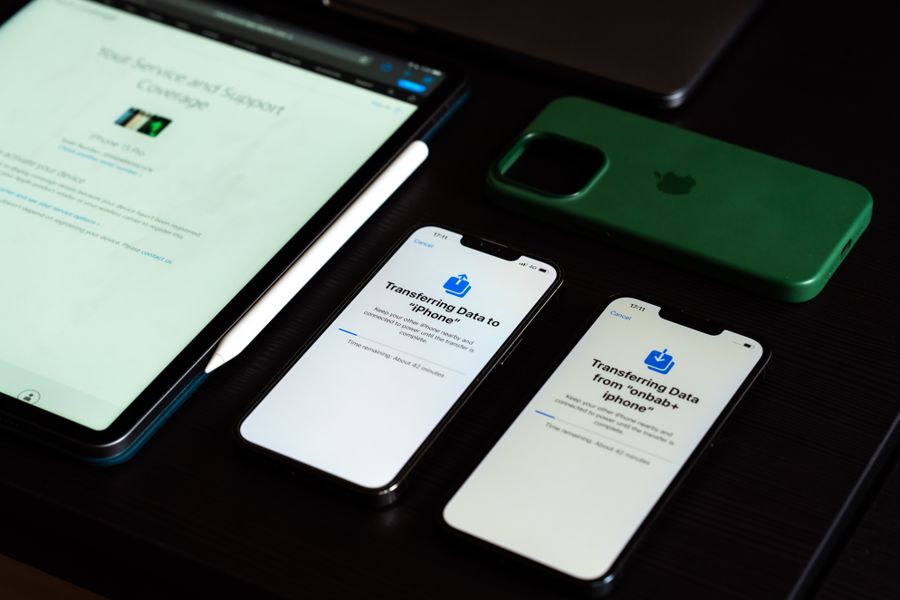
    Two iPhones side by side showing data transfer screens during a phone upgrade

    Start with the solid ground. On World Passkey Day 2026, the FIDO Alliance reported that roughly 5 billion passkeys are now in use worldwide, drawing on a survey of 11,000 consumers across ten countries. In that data, 90% of people are aware of passkeys, 75% have enabled a passkey on at least one account, and 49% use them regularly when the option exists. On the site side, 48% of the top 100 websites now offer passkeys, more than double the 2022 figure. You can read the headline findings in the FIDO Alliance’s 2026 passkey report. Adoption, in other words, is well documented. What happens during a phone upgrade is where the numbers thin out.

    Why there is no clean “lockout rate”

    Here is the part most headlines skip: no authoritative body publishes a reliable rate for how often people get locked out of accounts after upgrading a phone. Passkeys are young, recovery works differently on every platform and every website, and the companies that could measure lockouts, the big platforms and individual services, do not release that data in a comparable way. Any article claiming a precise figure is almost certainly guessing or quoting a single vendor’s internal sample. A single percentage would tell you very little anyway. What matters is the mechanism: whether your specific passkeys are the kind that travel to a new phone, and whether you left yourself a backup way in. Those two answers decide your outcome.

    What actually decides whether you get locked out

    Passkeys come in two flavors, and the difference is everything on upgrade day. Synced passkeys, which are the default when you create one on a modern iPhone or Android, are backed up to your Apple Account through iCloud Keychain or to your Google Account through Google Password Manager. When you set up a new phone and sign into that same account, the passkeys come with it, as Apple describes in its overview of how passkeys sync and recover. Device-bound passkeys are the other kind: they live only on one device or a hardware security key and do not sync anywhere. If your only passkey for an account was device-bound and that device is gone, that is when a phone upgrade turns into a recovery process. Knowing which type you have is the single most useful thing you can check.

    Where lockouts actually happen

    A person with their head in their hands at a desk, locked out and frustrated

    The trouble concentrates in a few predictable situations. The first is switching ecosystems, going from an iPhone to an Android or the reverse, because synced passkeys live in Apple’s or Google’s vault and do not automatically hop between them, so you may need to re-register on the new platform. The second is a passkey that was device-bound and never had a synced copy or a backup method. The third, and the most common in practice, is having a single sign-in method: one passkey, no backup codes, no secondary device, and a recovery email or phone number you no longer control. Forum posts about being “locked out of my account because of passkeys and no backup codes” almost always trace back to that last scenario, not to passkeys failing on their own.

    How to make a phone upgrade a non-event

    Prevention is quick and it is the whole game. Spend five minutes before you switch phones and a lockout becomes very unlikely:

    • Turn on cloud sync. Enable iCloud Keychain on iPhone or Google Password Manager on Android so your passkeys back up and restore automatically.
    • Keep a second way in. For important accounts, save the backup or recovery codes offline and keep an authenticator app or a second passkey as a fallback.
    • Register on two devices. Add a passkey to a tablet or laptop as well, so losing one device never removes your only key.
    • Update recovery contacts. Make sure the recovery email and phone number on your key accounts are current before you upgrade.
    • Do not wipe the old phone yet. Keep it accessible until you have confirmed you can sign in everywhere on the new one.

    What To Know

    • Synced passkeys, the default on modern phones, back up to Apple or Google and reappear on a new device automatically.
    • No authoritative source publishes a real passkey lockout rate, so exact percentages are unreliable.
    • Lockouts cluster in device-bound passkeys, iPhone-to-Android switches, and accounts with a single sign-in method.
    • Turning on cloud sync and keeping one backup method prevents almost every upgrade-day lockout.

    Frequently Asked Questions

    Do passkeys transfer to a new phone?

    Usually yes. Synced passkeys, which are the default on modern iPhones and Android phones, back up to your Apple Account or Google Account and automatically reappear on a new phone once you sign into that account. Device-bound passkeys, which live only on one device or a hardware key, do not transfer.

    How often do passkeys lock people out after a phone upgrade?

    There is no reliable published figure, because platforms and websites do not release comparable recovery data and passkeys are still new. For most people using synced passkeys, an upgrade does not cause a lockout. When lockouts do happen, they usually involve device-bound passkeys, an ecosystem switch, or having no backup sign-in method.

    What happens to my passkeys if I switch from iPhone to Android?

    They do not move automatically, because synced passkeys are stored in Apple’s or Google’s separate vaults. You will typically need to sign into each account another way and register a new passkey on the new platform. This is one of the most common reasons people hit a passkey snag, so plan for it when changing ecosystems.

    Can I get locked out of an account permanently because of a passkey?

    It is uncommon if you keep a backup method. Most services offer account recovery through a secondary email, phone, backup codes, or another registered device. Permanent lockouts generally require losing your only passkey and every recovery option at once, which is exactly what keeping a second sign-in method prevents.

    What is the safest way to set up passkeys before upgrading my phone?

    Turn on iCloud Keychain or Google Password Manager so passkeys sync, register a passkey on a second device like a laptop or tablet, save each important account’s backup codes offline, and confirm your recovery email and phone are current. Keep your old phone until you have verified sign-in on the new one.

    Are passkeys still worth using given the lockout risk?

    For most people, yes. Passkeys resist phishing and credential theft far better than passwords, and the upgrade risk is manageable with basic backups. The lockout stories usually come from having a single point of failure, which is a setup problem you can solve, rather than a flaw in passkeys themselves.

    What To Do Next

    Before your next phone upgrade, open your phone’s settings and confirm passkey sync is on, then add a backup method to your most important accounts and save their recovery codes somewhere offline. If you are on iPhone and passkeys are already giving you trouble, our guide to iPhone passkey login problems walks through the common fixes. For more on accounts and device security, browse Visboo’s Technology section.


    Tagged: Account Security cybersecurity Passkeys Phone Upgrade
    About the Author

    Aarav Deshmukh

    Aarav Deshmukh is a technology writer and gadget reviewer who follows AI, smartphones, and everyday digital tools with a practical eye. He focuses on helping readers understand what new tech actually changes in daily life.

    Related Stories

    A traveler in an airport terminal looking concerned at a smartphone with a suitcase beside them

    Why Switching to a Travel eSIM Breaks Your 2FA

    October 7, 2026September 23, 2026
    A person holding an iPhone at a login screen, trying to sign in with a passkey

    9 iPhone Passkey Login Problems After iOS Updates (2026)

    October 5, 2026September 23, 2026
    A robotic hand reaching toward a glowing laptop screen in blue light

    Can a Chatbot Be Tricked Into Logging In For You?

    September 21, 2026September 15, 2026
    A small brass padlock resting on a laptop keyboard lit by the screen's glow

    AI Can Now Log You In. What That Means for Security

    September 19, 2026September 15, 2026
    What You Need to Improve Your Communication and Cyber Security Technology

    What You Need to Improve Your Communication and Cyber Security Technology

    December 22, 2021December 23, 2021

    Leave a Reply Cancel reply

    You must be logged in to post a comment.

    Read Next

    A person taking notes on a laptop at a bright desk beside a window, with a notebook and coffee

    9 Notion Alternatives That Handle Offline Notes Better

    October 8, 2026September 23, 2026

    Notion added an offline mode, but it still stumbles on planes, in dead zones, and on flaky campus WiFi. Here are nine alternatives that treat offline as the default, compared on how they store your notes, platforms, and price.

    A person looking frustrated at an Android phone filling with news notification pop-ups

    5 NewsBreak Alternatives Without the Endless Pop-Up Alerts

    October 7, 2026September 23, 2026

    NewsBreak buries Android users in pop-up alerts you can barely turn off. Here are five news apps with real notification control, compared on topic filtering, free tiers, and who each is best for.

    A person at a Windows laptop organizing files and folders with a second monitor on the desk

    5 iCloud Drive Alternatives for Two-Way Windows Sync

    October 7, 2026September 23, 2026

    iCloud for Windows is notorious for flaky, one-way sync. Here are five alternatives that do reliable two-way folder sync with real File Explorer support, compared on price and features.

    How Mobile Technology Is Transforming Sports Betting Experiences

    How Mobile Technology Is Transforming Sports Betting Experiences

    October 6, 2026October 7, 2026

    Mobile innovation has redefined how users interact with online platforms and sports betting is no exception. With smartphones now the primary way many people access digital

    More

    Recent Articles

    A hand holding an iPhone showing a news feed of repeated, near-identical story cards

    6 Google News Alternatives for iPhone Without the Repeats

    A student studying at a laptop showing flashcard-style cards, with a notebook and coffee on the desk

    How to Import Quizlet Sets Into Anki via CSV

    A person at a home desk filling out a rental application on a laptop with a document and apartment keys nearby

    Can a Digital Pay Stub Verify Income for Renting?

    A traveler with a backpack and suitcase looking concerned at a smartphone in an airport terminal

    7 eSIM Setup Mistakes That Break Data After You Land

    A worried man at a kitchen table holding a phone to his ear next to an official-looking envelope

    8 Signs a ‘Process Server’ Call Is a Debt-Collection Scam

    A person taking notes on a laptop at a bright desk beside a window, with a notebook and coffee

    9 Notion Alternatives That Handle Offline Notes Better

    A hand holding a smartphone glowing with an urgent red alert while a worried person looks on in a dark room

    10 Signs a ‘Breaking News’ Text Is a Smishing Scam

    A car key and vehicle documents changing hands across a table with a sedan visible through the window

    8 Title Transfer Mistakes That Wreck a Private Car Sale

    A person looking frustrated at an Android phone filling with news notification pop-ups

    5 NewsBreak Alternatives Without the Endless Pop-Up Alerts

    A person at a Windows laptop organizing files and folders with a second monitor on the desk

    5 iCloud Drive Alternatives for Two-Way Windows Sync

    The Evolution of Sports Betting in India

    The Evolution of Sports Betting in India

    A traveler in an airport terminal looking concerned at a smartphone with a suitcase beside them

    Why Switching to a Travel eSIM Breaks Your 2FA

    How the Statistical Revolution Changed Soccer Betting

    How the Statistical Revolution Changed Soccer Betting

    A person at a home desk looking at a laptop with a blank screen while waiting for a video appointment to load

    Telehealth Link Opens Blank on Safari? How to Fix It

    A hand plugging a fast-charging connector into an electric car's charge port at a charging station

    NACS-to-CCS Adapter Alternatives for ‘Connected but Not Charging’

    Recent Comments

    • Help With Law Coursework on Benefits Of Digital Citizenship For Students
    • mTouchlabs on How to Create An Educational App From Scratch
    • Web Development on The Rise Of Artificial Intelligence: Prospects and Potential Threats
    • mekvahan on Never hesitate to service your vehicle- here are the facts
    • Maniha shah on How E-learning helps Achieving Academic Objectives?
    • Qdesq on Benefits Of Having A Virtual Office Space
    • Sekhar Sahu on 5 Modern Study Table Designs to Enhance Your Home
    • coca on 5 Design Tips for Elegant Kitchen Remodeling That You’ll Love in 2020
    • T1000 on Ads Supply Review – A Self-Service Advertising Platform
    • Techolas on Software Testing: What is It and Why You Should Be There
    #techreviews

    Topics

    • Autos
    • Business
    • Education
    • Entertainment
    • Family & Personal
    • Finance
    • Health
    • Home Improvement
    • Law
    • Lifestyle
    • News
    • Technology
    • Travel

    Archives

    • October 2026
    • September 2026
    • June 2026
    • April 2026
    • January 2025
    • June 2023
    • May 2023
    • March 2023
    • February 2023
    • January 2023
    • December 2022
    • November 2022
    • October 2022
    • September 2022
    • August 2022
    • July 2022
    • June 2022
    • May 2022
    • April 2022
    • March 2022
    • February 2022
    • January 2022
    • December 2021
    • November 2021
    • October 2021
    • September 2021
    • August 2021
    • July 2021
    • June 2021
    • May 2021
    • April 2021
    • March 2021
    • February 2021
    • January 2021
    • December 2020
    • November 2020
    • October 2020
    • September 2020
    • August 2020
    • July 2020
    • June 2020
    • May 2020
    • April 2020
    • March 2020
    • February 2020
    • January 2020
    • December 2019
    • November 2019
    • October 2019
    • September 2019
    • August 2019
    • July 2019
    • June 2019
    • May 2019
    • April 2019
    • March 2019
    • February 2019
    • January 2019
    • December 2018
    • November 2018
    • October 2018
    • September 2018
    • July 2018
    • June 2018
    • May 2018
    • April 2018
    • March 2018
    • February 2018
    • January 2018
    • December 2017
    • November 2017
    • October 2017
    • September 2017
    • August 2017
    • July 2017
    • June 2017
    • May 2017
    • April 2017
    • March 2017
    • February 2017
    • January 2017
    • December 2016
    • November 2016
    • October 2016
    • September 2016
    • August 2016
    • July 2016
    • June 2016
    • May 2016
    • April 2016
    • March 2016
    • February 2016
    • January 2016
    • December 2015
    • November 2015
    • October 2015
    • September 2015
    • August 2015
    • July 2015
    • June 2015
    • May 2015
    • April 2015
    • March 2015
    • February 2015
    • January 2015
    • December 2014
    • June 2014
    • March 2013
    • February 2013

    Pages

    • Home
    • Contact

    Search

    Useful Sites

    • RunCloud
    • XE

    Stay Updated

    • Youtube
    [mc4wp_form id="2880"]

    Recent

    • 6 Google News Alternatives for iPhone Without the Repeats
    • How to Import Quizlet Sets Into Anki via CSV
    • Passkey Lockouts After a Phone Upgrade: The Real Data
    • Can a Digital Pay Stub Verify Income for Renting?
    • 7 eSIM Setup Mistakes That Break Data After You Land
    • 8 Signs a ‘Process Server’ Call Is a Debt-Collection Scam
    • 9 Notion Alternatives That Handle Offline Notes Better
    • 10 Signs a ‘Breaking News’ Text Is a Smishing Scam
    • 8 Title Transfer Mistakes That Wreck a Private Car Sale
    © Copyright 2026 by Visboo. All Rights Reserved.
    Go to mobile version